
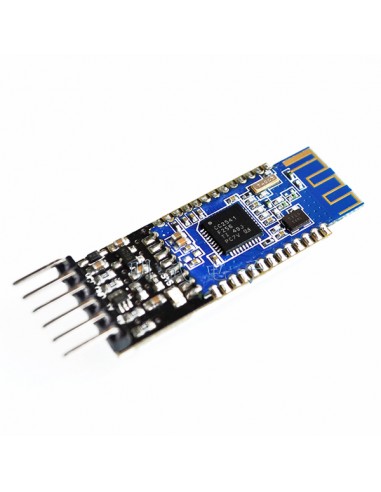
HM-10 BLE CC2540 Module with Logic Level Shifter | HackSpark
search
  • HM-10 BLE CC2540 Module with Logic Level Shifter | HackSpark
  • HM-10 BLE CC2540 Module with Logic Level Shifter | HackSpark

HM-10 Serial Port BLE CC2540 Module with logic level translator (Master/Slave)

€10.20
Tax included

The HM-10 is a 4.0 BLE Bluetooth module (CC2540) with 3.3V/5V logic level translator. Configurable via AT commands, supports Master/Slave modes, and allows remote control of 10 PIO pins. An excellent replacement for HC-05/06/07 in BLE projects.
Quantity

If you need a 4.0 BLE Bluetooth module, the HM-10 is the best choice. It can be set up directly or controlled by a remote Bluetooth device for settings, data transfer, and remote control of 10 PIO pins. It can replace HC-05, HC-06, HC-07, etc.

Supports Central and Peripheral mode switching, modified via AT commands.

Supports Remote Control mode: a remote device can control PIO pins or modify settings via AT commands when connected (compatible with iPhone 4s/5, iPad, Note2, etc.).

The Bluetooth UART RS232 Serial Converter Module easily transfers UART data wirelessly without complex PCB layout or deep knowledge of the Bluetooth software stack. You can combine this Bluetooth module with your system:

  • MCU, ARM, or DSP systems.
  • SoC systems.
  • Personal Digital Assistants (PDAs).
  • Computer Accessories.
  • Other systems you want to use with Bluetooth functions.

Device Features

  • TI cc2540 Bluetooth Chip Solution
  • Fully Qualified Bluetooth V4.0 BLE
  • Full Speed Bluetooth Operation with Full Piconet and Scatternet Support
  • Incredibly small size with 3.3V input, and RoHS Compliant
  • UART interface with baudrate setup function

AT Commands (new version V542)

  • AT (Test command)
  • AT+BAUD (Query/Set Baud rate)
  • AT+CHK (Query/Set parity)
  • AT+STOP (Query/Set stop bit)
  • AT+UART (Query/Set UART rate, parity, stop bit)
  • AT+PIO (Query/Set PIO pins status - Long command)
  • AT+PIO (Query/Set a PIO pin status - Short command)
  • AT+NAME (Query/Set device friendly name)
  • AT+PIN (Query/Set device password code)
  • AT+DEFAULT (Reset device settings)
  • AT+RESTART (Restart device)
  • AT+ROLE (Query/Set device mode, Master or Slave)
  • AT+CLEAR (Clear remote device address if present)
  • AT+CONLAST (Try to connect to the last successfully connected device)
  • AT+VERSION (Show software version information)
  • AT+HELP (Show help information)
  • AT+RADD (Query remote device address)
  • AT+LADD (Query self address)
  • AT+IMME (Query/Set whether the device boots immediately)
  • AT+WORK (If device not working, start work, use with AT+IMME command)
  • AT+TCON (Query/Set number of remote connection attempts)
  • AT+TYPE (Query/Set device work type, transceiver mode or remote mode)
  • AT+START (Switch remote control mode to transceiver mode)
  • AT+BUFF (Query/Set how to use buffer data, during mode switching time)
  • AT+FILT (Query/Set device filter when device searching) A
  • T+COD (Query/Set Class of Device. eg: phon…[TRUNCATED]
WIRHM10PCB
1 Item
New

You might also like